2D Structural Analysis, Without the Compromise
Built for fast, conceptual design — not a stripped-down version of 3D software. Model, analyze, and get results in minutes.
Launch RodX 2D FEA →No sign-up required to start · Verified against analytical solutions · PDF reports
Why Choose RodX?
Built for Fast Decisions
Every unnecessary click is gone. Model, analyze, and get results without hunting through menus.
Sketch → Model → Analyze → Result
No Installation Required
Runs in your browser. No downloads, no waiting on IT, no license dongles.
Open browser → Build model → Run analysis
Verified, Not Just Trusted
Results and diagrams are verified against closed-form solutions.
RodX result = analytical solution cross-check
For Whom
RodX is built for fast, conceptual structural evaluation — from a first sketch to a validated hypothesis, before committing to detailed design software.
Structural Engineers
Test design ideas, size elements, and validate load paths early — before moving into detailed modeling in Midas, SAP2000, or similar tools.
Independent & Small-Firm Engineers
Skip the licensing overhead of full-scale FEA suites for projects that need quick, reliable conceptual checks.
Academia
Teach FEM fundamentals or run student projects on a browser-native tool built for structural engineering education and practice.
Features & Capabilities
Core Calculation Features
- ✓ 2D Finite Element Method (FEM)
- ✓ Element types: Beam, Truss, tension-only elements
- ✓ Elastic supports, hinges
- ✓ P-Delta analysis
- ✓ Load combinations
Results & Reporting
- ✓ N/Q/M/σ diagrams
- ✓ Deflection visualization
- ✓ PDF report generation
- ✓ Export results to XLS
Libraries & Data Management
- ✓ Built-in global material and section libraries
- ✓ EU, US, AU, IN, VN and other standards
- ✓ Custom sections and materials
Modeling & Interface
- ✓ Truss modeling wizard
- ✓ Structured model tree
- ✓ Element groups
- ✓ Import: DXF, JSON / Export: JSON
- ✓ Tables for model
Verification
Every result is checked against closed-form solutions.
Here's one example: Cantilever Column with Combined Axial and Lateral Load (P-Delta Effect)
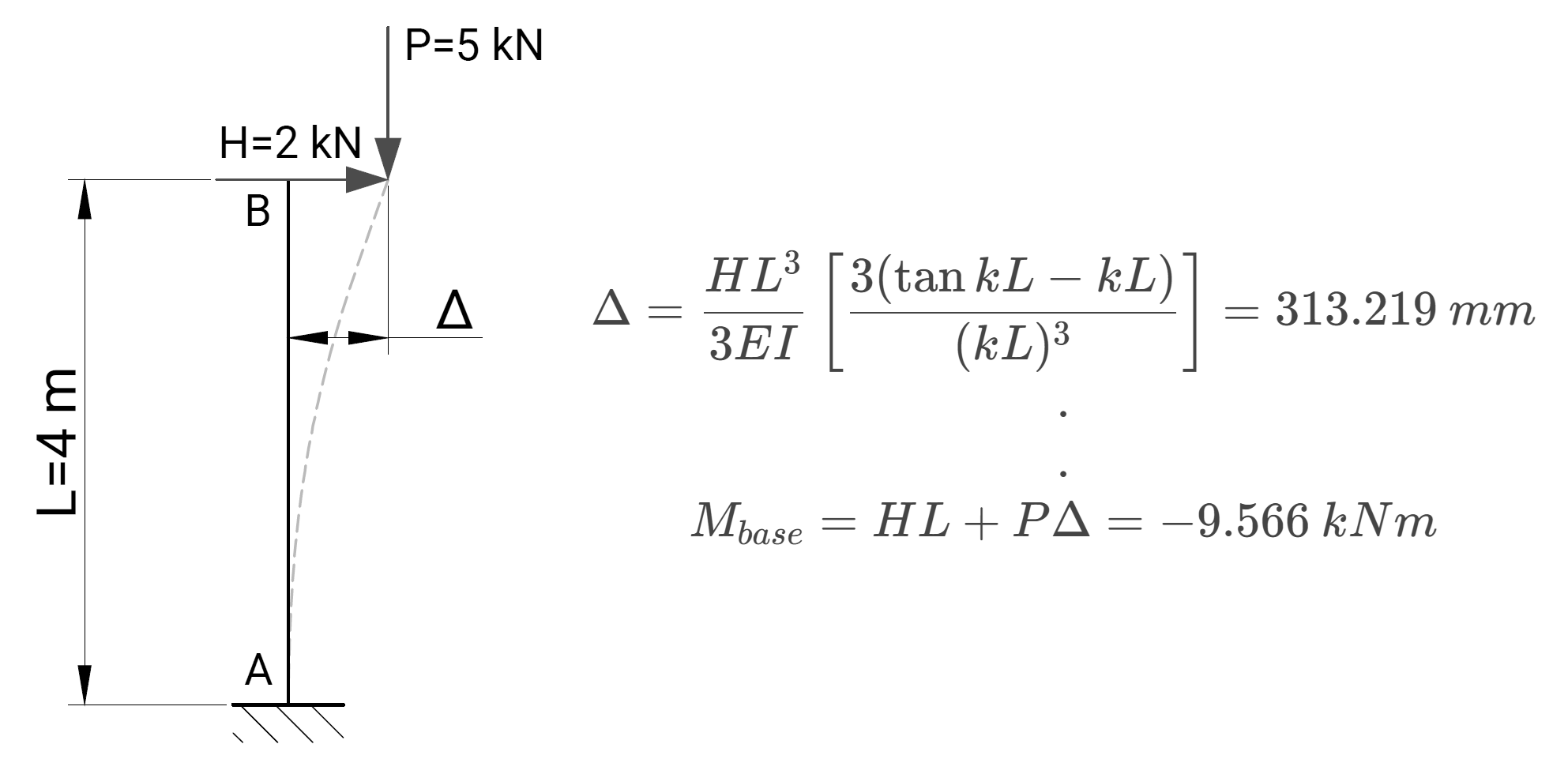

One of 10+ verification cases — see the full suite on Verification
Simple, Transparent Pricing
Early-bird offers are available through December 31, 2026 (Bangkok time).
Until October 14, 2026, the Free plan automatically includes all Solo features — no paid subscription is required. Starting October 15, the Free plan will have its standard limits, and Solo will be available as a paid subscription.
Free
Always free
Full access to core analysis tools, with limits on model size and usage — perfect for trying RodX on real projects.
- ✓Up to 20 nodes, 30 elements per model
- ✓Up to 5 calculations per day
- ✓Up to 5 saved models
- ✓Linear static analysis
- ✓Basic modeling tools & boundary conditions
Solo
Monthly subscription
$25/month for 12 billing periods, then $39/month.
Full, unlimited access for individual structural engineers — no caps on models or calculations.
- ✓Unlimited models, elements, and calculations
- ✓PDF report generation
- ✓Beam & Truss modeling wizards
- ✓P-Delta analysis
- ✓Import/export & advanced modeling tools
- ✓Email support
Team
In development
For structural engineering firms and teams working on shared projects.
- ✓Everything in Solo, for every team member
- ✓Shared projects and team workspace
- ✓Centralized billing for your firm
- ✓Priority support
Student or educator?
What You Don't Pay For
No perpetual licence
Nothing to buy up front, no long procurement process.
No forced renewal
Monthly by default, yearly only if you want the discount.
No per-device seats
One subscription price, whatever device you sign in from — desktop, laptop, or tablet.
No expiring project files
Your models stay accessible even if you move back to a lower plan.
No material/section add-ons
Steel, concrete, and section properties are included, not sold separately.
No lock-in
Cancel anytime — no minimum term, no cancellation fee.
No hidden licensing layers. No surprises after you start modeling.
Frequently Asked Questions
What types of calculations can I perform?
RodX supports linear static analysis as well as P-Delta analysis. Supported element types include beam (Euler-Bernoulli), truss, and tension-only elements.
Is there an option to import models from other programs?
Yes. You can import from DXF and JSON files (RodX's native structure).
Will there be adaptation for tablets or phones?
Since early July, RodX has undergone major updates, and a mobile-friendly version is currently being adapted to the new interface. The mobile version will be available in the coming months. Check our Updates page for what's coming each month.
Can I perform detailed calculations?
RodX is built for conceptual and preliminary design — validating ideas fast, before committing to detailed modeling. It's not intended to replace detailed design software for final calculations, code compliance checks, or construction documentation. That said, many engineers use RodX results as supporting material or a cross-check within a broader workflow — always subject to their own professional judgment and applicable design codes.
What's the difference between trying RodX, Free, and Solo?
You can try RodX instantly with no sign-up, with basic limits on model size, calculations and tools. Creating a free account raises those limits. During our early access period, everyone with a free account also gets Solo-level features at no extra cost. Reserve now — independently of this — to lock in the early-bird price for when paid plans launch.
Do I need to sign up to try RodX?
No. You can start modeling and running calculations immediately, with basic limits on model size and number of calculations. Creating a free account removes those limits and unlocks more tools.
Is there a discount for academic use?
Yes. Students and educators can request academic access through our academic access form — just tell us your country, institution, department, and role. Approved requests get free access for one year, for academic and non-commercial use, reviewed manually within a few days. Full terms apply — see our Terms of Use.
About
My name is Antonio, and I am a structural and geotechnical engineer with over 15 years of experience in bridge design, transport infrastructure, foundations, and complex structural analysis. Throughout my career, I have used a wide range of FEA tools and learned firsthand how powerful — and at the same time, how cumbersome — structural analysis software can be.
RodX was created to solve this problem: to provide fast, intuitive, and reliable 2D FEA that fits naturally into the way engineers think and work.
Every feature in RodX is shaped by real engineering practice. The platform is designed to support the engineer's judgment, streamline routine work, and provide clear, accurate results — while keeping the final engineering decisions exactly where they belong: in the hands of the qualified professional using the tool.

Ready when you are
Start modeling without installation or commitment.
Build your first model, run the analysis, and see the result in minutes.
Launch RodX 2D FEA →